
Use Graftcode alongside an existing REST API
Graftcode and REST solve different integration problems. They can coexist in one product when each boundary has a clear owner. You do not have to move every client to generated Grafts before you adopt Graftcode.
When to keep REST
Keep REST (or OpenAPI) when:
- external clients require a public HTTP contract;
- partners integrate via webhooks or fixed URLs;
- Callers cannot install a generated Graft.
When to add Graftcode
Add Graftcode for internal or controlled callers that can install generated packages:
- service-to-service method calls across languages;
- sharing a Receiver library without hand-written HTTP clients;
- flipping between in-memory and remote execution with configuration alone.
Typical layout
You do not need a big-bang migration. Graftcode Gateway (gg) can host existing HTTP/REST
workloads while also exposing a Graftcode Receiver surface from the same deployment. External clients
keep calling REST routes; controlled Callers install generated Grafts when you are ready.
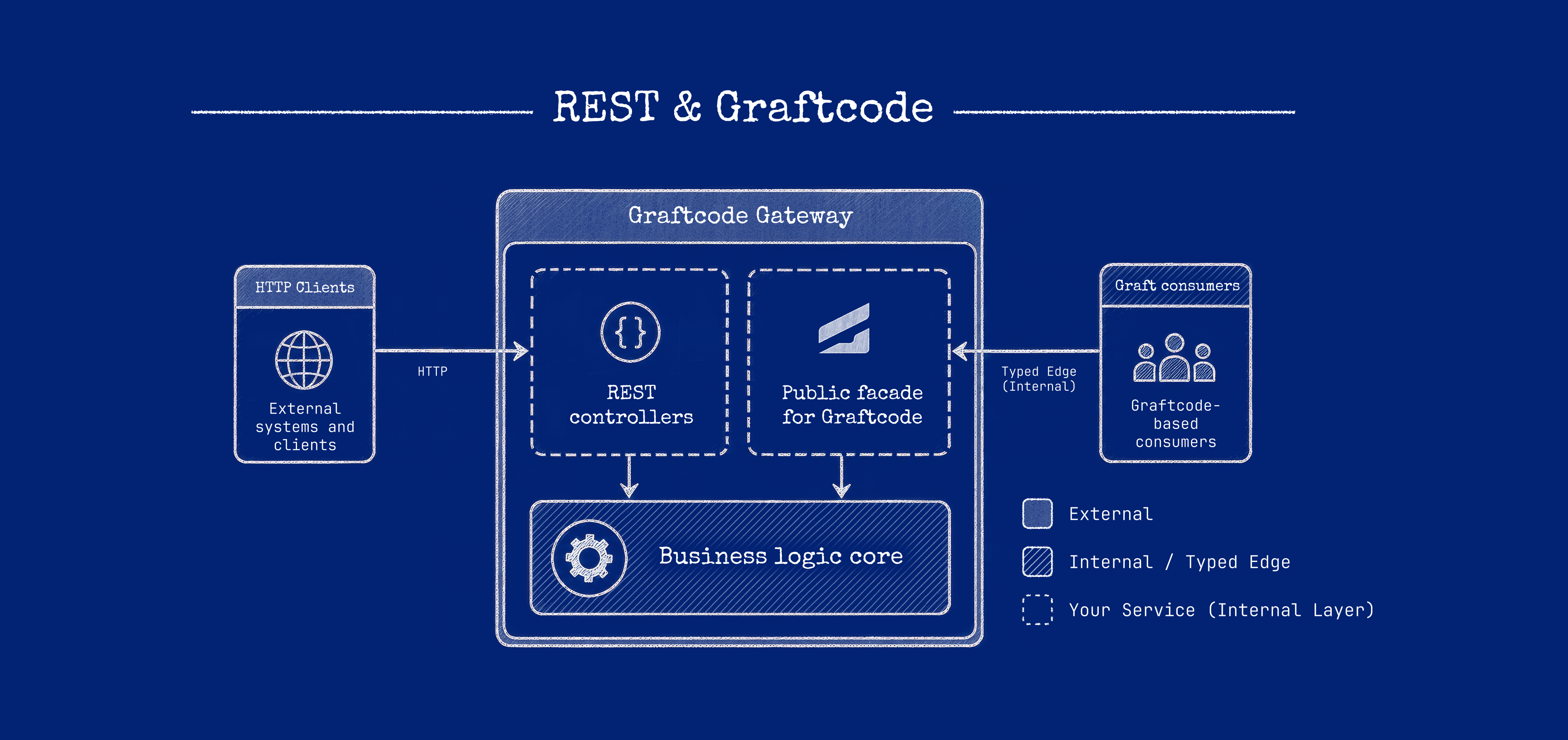
REST integration starts from manually designed resources, routes, HTTP verbs, and payloads. Graftcode integration starts from an analyzed callable surface and a generated Graft. Both cross a boundary; the difference is who maintains the integration layer and which clients use which path.
Steps
- Extract callable business logic into a plain module (class library or package)—not controller types on the public Graft surface.
- Keep REST controllers as thin adapters that call the same module internally if needed.
- Host the module with Gateway for Graft Callers.
- Do not expose database or HTTP framework types on the Graft contract.
Host REST through Gateway
For a published ASP.NET Web API on the same host:
- Publish the Web API to a folder (for example
dotnet publish). - Set
ASPNETCORE_CONTENTROOTto that publish folder and the otherASPNETCORE_*variables your app expects (application name, environment, hosting startup). - Start Gateway with
--runAppso the Web API entry point runs and REST routes stay available. - Expose the plain business module as the Graftcode Receiver surface so Gateway can generate Grafts for controlled Callers.
REST requests and Graft invocations use separate paths on the same host. See
Gateway CLI reference for --runApp, ports, and runtime
options.
After installing a Graft from Vision, configure remote execution before the first call. See Configure invocation.
How they compare
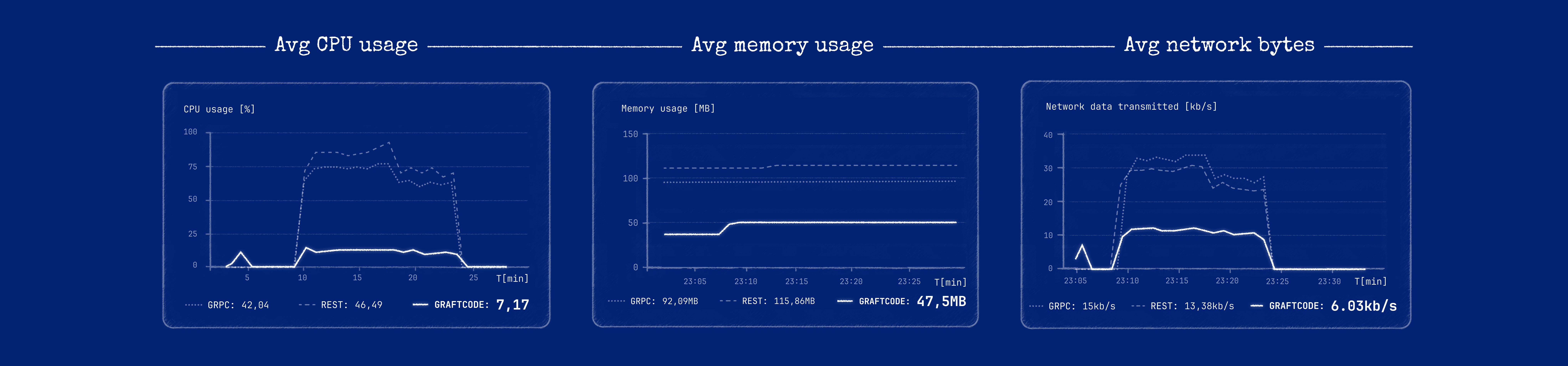
REST and gRPC keep a protocol contract (URLs/operations, schemas, and a client) separate from your business code. With Graftcode the supported public method surface is the contract and the installed Graft is the client. Neither is universally faster; the right choice depends on who owns the contract, who the Callers are, and your interoperability, streaming, and browser needs.
Graftcode removes application-authored controllers, DTO mapping, transport clients, and serialization code for controlled Callers. Its runtime still represents and transfers invocation data, so the resulting performance depends on the runtime pair, execution mode, payload, transport, topology, and workload. This documentation does not publish comparative performance numbers without a documented, reproducible benchmark.